Mastering Micro-Frontends: Architecture, Implementation & Best Practices
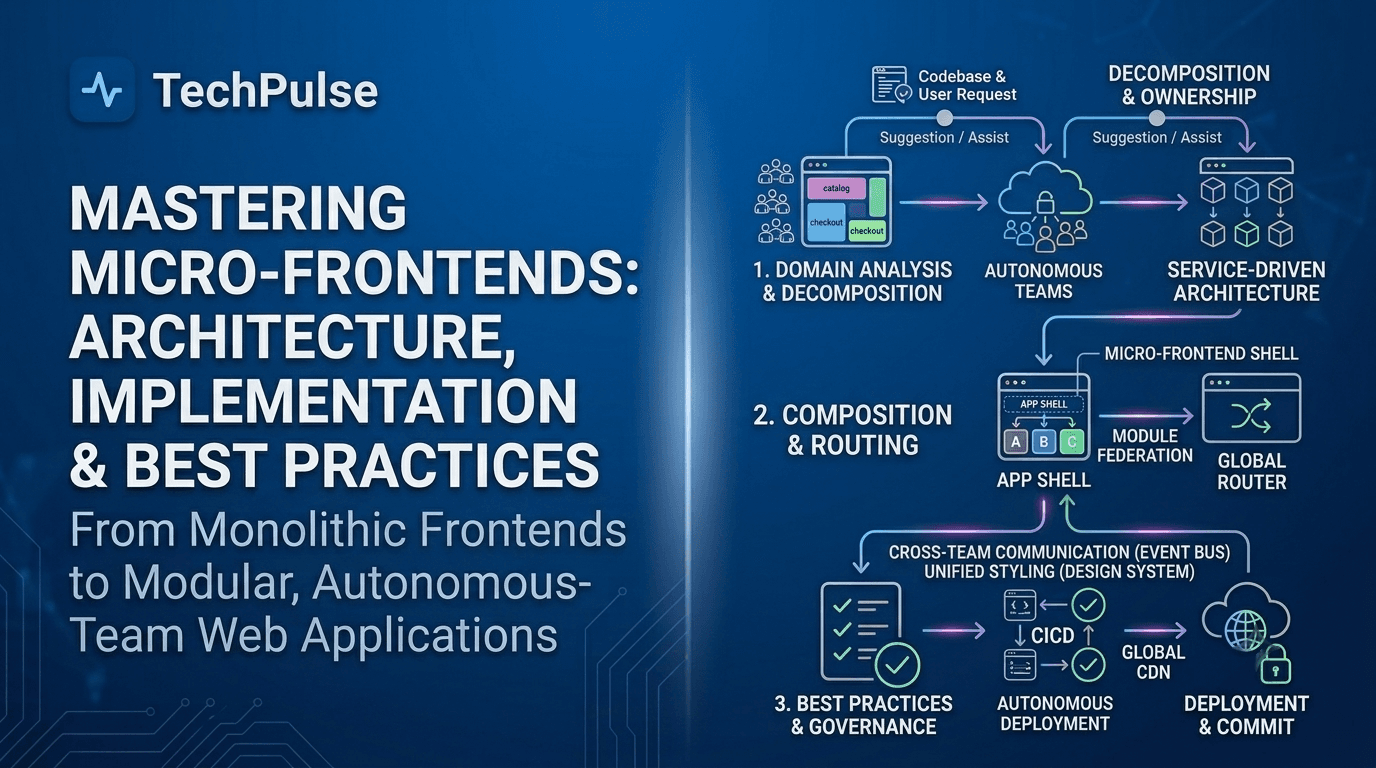
The Evolution of Micro-Frontends: From Monoliths to Edge‑First Architectures
Traditional web applications bundled every UI component, routing logic, and state management into a single monolithic JavaScript payload, forcing teams to coordinate releases, share a common build pipeline, and accept a single point of failure for performance and security.
Starting in the early 2020s, the industry pivoted toward micro‑frontend decomposition, and by 2026 edge‑first patterns dominate: each feature is compiled, cached, and served from CDN edge nodes, while lightweight edge functions perform runtime composition, delivering sub‑second latency even under global traffic spikes.
Pro Tip
Version micro‑frontend assets with immutable hashes and configure edge caches to respect `Cache‑Control: immutable`—this eliminates cache‑busting logic and guarantees instant updates on new deployments.
Warning
Beware of stale edge caches; a mis‑configured TTL can serve outdated UI components for hours, causing UI/UX regressions that are hard to trace back to the source.
Deep Dive Architecture
Edge composition layer: a lightweight Cloudflare Workers or AWS Lambda@Edge script reads a manifest, resolves dependency graphs, and streams HTML fragments from the nearest edge node.
Observability stack: distributed tracing (OpenTelemetry) spans across edge functions, CDN fetches, and browser execution, enabling end‑to‑end latency budgeting for each micro‑frontend slice.
| Architecture | Deployment Model | Avg Latency (ms) | Cache Strategy |
|---|---|---|---|
| Monolith | Single bundle from origin | 120 | No edge caching |
| Server‑Side Rendered MFEs | SSR per request, CDN static assets | 45 | CDN static, limited dynamic |
| Edge‑First MFEs | Edge functions + immutable assets | 12 | Immutable edge cache + TTL |
Pros
- +Reduced Time‑to‑First‑Byte via edge caching
- +Independent deployments eliminate release bottlenecks
- +Localized feature flags enable real‑time personalization
Cons
- —Higher operational overhead for edge function management
- —Complex cache invalidation across multiple micro‑frontends
- —Tooling fragmentation between build, CDN, and edge layers
Real-World Engineering Examples
- Spotify's web player migrated its playlist editor to an edge‑served micro‑frontend, cutting first‑paint time from 2.3 s to 0.9 s for users in Asia.
- Shopify's Hydrogen storefront now serves each product card as an independent edge‑cached component, allowing merchants to push UI updates without a full site redeploy.
Pro Tip
Edge‑first micro‑frontends transform global UI delivery into a latency‑aware, independently deployable system, making front‑end scalability a first‑class concern in 2026.
Why Edge‑First Matters in 2026
Edge networks now provide sub‑10 ms round‑trip times to 95% of users, turning latency into a competitive moat; micro‑frontends can be individually versioned and cached at the edge, allowing instant roll‑outs without waiting for a global CDN purge.
Personalization engines running at the edge can inject feature flags, A/B test variants, or locale‑specific bundles directly into the HTML stream, reducing the need for client‑side feature detection and shrinking the critical rendering path.
Composable UI with WebAssembly: Leveraging Rust, AssemblyScript, and WASI
WebAssembly (Wasm) is emerging as a lingua franca for micro‑frontend components, allowing teams to write UI logic in any language that can compile to the binary format and then run it alongside JavaScript in the browser. By sandboxing each component in its own Wasm instance, developers gain true runtime isolation without the overhead of iframe‑based approaches, while still sharing a common rendering pipeline through the DOM or a virtual‑DOM bridge.
The performance characteristics of Wasm—near‑native CPU execution, deterministic memory layout, and fast start‑up when streamed—make it ideal for compute‑heavy widgets such as data visualizations, image editors, or cryptographic UI helpers. Coupled with the WebAssembly System Interface (WASI), these components can also perform file‑like I/O, threading, or networking in a secure, portable way, extending micro‑frontend capabilities beyond what pure JavaScript can achieve.
Pro Tip
Cache Wasm modules with a long max‑age header and use the Subresource Integrity (SRI) attribute to guarantee binary integrity across deployments.
Warning
Beware of oversized linear memories; allocating more than needed can bloat the module and increase garbage‑collection pressure in the host JavaScript runtime.
Deep Dive Architecture
Each Wasm instance exposes an import object; the host supplies DOM manipulation functions (e.g., `createElement`, `setAttribute`) that the compiled module calls, keeping the UI logic language‑agnostic.
WASI provides a POSIX‑like API surface (fd_write, fd_read, poll_oneoff) that can be shimmed in the browser to enable file‑system‑like interactions without breaking the sandbox model.
| Language | Compile Size (KB) | Startup Latency (ms) | Ecosystem Support |
|---|---|---|---|
| Rust | 12 | 25 | Strong (crates.io, wasm‑bindgen) |
| AssemblyScript | 8 | 18 | Growing (TypeScript‑friendly) |
| C/C++ (Emscripten) | 15 | 30 | Mature but heavier toolchain |
Pros
- +True runtime isolation without iframe overhead
- +Near‑native performance for compute‑intensive UI
- +Language‑agnostic component development
Cons
- —Steeper build pipeline and toolchain learning curve
- —Limited direct access to browser APIs (requires glue code)
- —Wasm binary size can be larger than minified JS for trivial logic
Real-World Engineering Examples
- Spotify’s Web Player uses a Rust‑compiled Wasm module for its audio‑visualizer, achieving a 2× FPS boost over the previous JavaScript implementation.
- Figma’s plugin ecosystem now supports AssemblyScript‑compiled Wasm plugins, allowing designers to run custom layout algorithms directly in the editor without loading external scripts.
Pro Tip
WebAssembly transforms micro‑frontends from a JavaScript‑only paradigm into a polyglot, high‑performance ecosystem where isolated, language‑native components can coexist seamlessly, unlocking new levels of UI scalability and security.
Isolation and Performance at the Edge
When a micro‑frontend is compiled to Wasm, the browser creates a separate linear memory and execution context for that module. This prevents state leakage between components, eliminates the risk of accidental global variable clashes, and enables fine‑grained memory budgeting per widget. The isolation model mirrors the sandboxing benefits of iframes but with a fraction of the payload size and zero‑layout reflows.
Streaming compilation further reduces perceived latency: the browser can begin decoding and compiling the Wasm binary as soon as the first bytes arrive, allowing UI elements to appear progressively. In practice, a Rust‑based charting library can render a 10 kB Wasm payload in under 30 ms on modern devices, outperforming a comparable JavaScript library that requires 60 ms for parsing and JIT warm‑up.
Serverless Edge Runtimes as Deployment Targets
The last few years have seen a paradigm shift from traditional CDN‑cached assets to truly executable code at the network edge. By moving micro‑frontend rendering, authentication, and routing logic into serverless edge runtimes, developers can achieve sub‑10 ms response times for end‑users, regardless of geographic location. Platforms such as Cloudflare Workers, Vercel Edge Functions, and Netlify Edge Handlers expose a lightweight V8 isolate that runs JavaScript (or Wasm) directly on edge nodes, eliminating the round‑trip to a central origin server.
Because each edge runtime provides a sandboxed environment with built‑in KV stores, secret management, and request/response streaming, micro‑frontends can be composed on‑the‑fly: a request for "/checkout" can be intercepted, enriched with user session data, and then delegated to the appropriate UI bundle without ever hitting a monolithic backend. This model not only reduces latency but also simplifies versioning, as each micro‑frontend can be deployed independently to the edge layer.
Pro Tip
Leverage the platform‑specific caching APIs (e.g., Cloudflare's Cache API) to store rendered fragments for a few seconds; this dramatically reduces compute cost while preserving ultra‑low latency.
Warning
Edge runtimes enforce strict execution time limits (typically 50 ms‑100 ms). Complex data fetching or heavy computation must be offloaded to origin services or background workers, otherwise you’ll hit timeout errors.
Deep Dive Architecture
Isolation model: each request runs in its own V8 isolate, guaranteeing memory safety but requiring cold‑start mitigation via keep‑alive patterns and pre‑warming routes.
Integration points: edge KV/DB, edge secrets, and streaming responses are accessed via platform SDKs that differ slightly in API shape but share a common async/await paradigm.
| Feature | Cloudflare Workers | Vercel Edge Functions | Netlify Edge Handlers |
|---|---|---|---|
| Language Runtime | V8 (JS/TS, Wasm) | V8 (JS/TS, Wasm) | V8 (JS/TS, Wasm) |
| Max Execution Time | 50 ms (free) / 100 ms (paid) | 50 ms (free) / 100 ms (paid) | 50 ms (free) / 100 ms (paid) |
| KV Store | Cloudflare KV / Durable Objects | Vercel KV (beta) | Netlify Edge KV |
| Deploy Size Limit | 10 MB | 5 MB | 10 MB |
| Global Nodes | 300+ | 150+ | 200+ |
Pros
- +Sub‑millisecond latency for end users
- +Independent deployment of UI fragments
- +Built‑in security sandbox with per‑request isolation
Cons
- —Strict CPU‑time quotas can limit complex logic
- —Vendor‑specific SDKs create lock‑in risk
- —Debugging at the edge requires specialized tooling
Real-World Engineering Examples
- A global e‑commerce site deployed its product carousel as a Cloudflare Worker that pulls the latest inventory from a KV store, delivering personalized recommendations in <8 ms per request.
- A SaaS dashboard uses Vercel Edge Functions to inject feature‑flag driven UI components based on JWT claims, allowing instant rollout of beta features without redeploying the entire app.
Pro Tip
Deploying micro‑frontends to serverless edge runtimes transforms latency from a network problem into a compute problem, unlocking sub‑10 ms experiences while preserving independent, versioned delivery of UI components.
Key Architectural Patterns
Edge‑side routing: a lightweight router evaluates the URL path and headers, then forwards the request to the correct micro‑frontend bundle stored in a distributed KV store. This pattern enables A/B testing and canary releases at the edge with zero downtime.
Edge‑computed personalization: by accessing signed JWTs or edge‑stored session data, the edge function can inject personalized feature flags or UI variants before the HTML is streamed to the browser, ensuring the user sees the correct experience instantly.
AI‑Driven Component Generation and Runtime Adaptation
Large language models (LLMs) have matured from static code assistants to autonomous UI factories. By feeding a high‑level design prompt—such as "create a responsive product card with price tier badges and a dark‑mode toggle"—the model emits a complete React component, including styled‑components definitions, accessibility attributes, and unit tests. This generated artifact is then versioned in a GitOps pipeline, automatically linted, and published to an internal component registry. The key advantage is that development teams no longer hand‑craft boilerplate micro‑frontend fragments; instead they delegate repetitive UI patterns to the AI, freeing senior engineers to focus on domain‑specific logic and performance tuning.
At runtime, the same LLM can act as a personalization engine. When a user logs in, contextual signals (locale, device capabilities, subscription tier) are sent to an inference endpoint that returns a JSON manifest describing which micro‑frontends to compose, their feature flags, and even variant‑specific styling tweaks. The host application consumes this manifest, dynamically imports the required bundles via a federated module loader, and stitches them together on the client. Because the manifest is generated per request, the UI can adapt in real time to evolving business rules without redeploying any static assets, achieving true continuous delivery at the UI layer.
Pro Tip
Cache AI‑generated manifests at the edge (e.g., Cloudflare Workers) to shave off network latency and reduce inference costs.
Warning
Never trust AI‑generated code blindly; always run it through static analysis and a sandboxed test harness before publishing.
Deep Dive Architecture
LLM Prompt → Code Generator Service (Dockerized, GPU‑enabled) → AST Linter → Component Registry (NPM‑style) → Versioned Artifact
Runtime Manifest Service → Schema Validator → Dependency Graph Builder → Module Federation Loader → UI Render
| Feature | LLM‑Based Generator | Template‑Driven Builder |
|---|---|---|
| Code Freshness | Generates brand‑new code per request | Reuses pre‑written templates |
| Personalization | Context‑aware manifests | Limited to feature flags |
| Maintenance Overhead | Requires LLM ops & prompt hygiene | Simpler CI pipeline |
| Risk Profile | Higher risk of syntactic bugs | Lower risk, but less flexibility |
| Performance | Dependent on inference latency | Predictable bundle size |
Pros
- +Accelerates UI scaffolding and reduces boilerplate
- +Enables per‑user UI personalization without redeployment
- +Maintains a single source of truth for shared dependencies
Cons
- —Inference latency can impact first‑paint time
- —Generated code may introduce subtle accessibility regressions
- —Cache invalidation logic becomes more complex
Real-World Engineering Examples
- Shopify's Hydrogen platform uses an LLM to generate product‑detail micro‑frontends on demand, tailoring layout based on merchant‑specific theme settings.
- Airbnb's internal dashboard dynamically composes reporting widgets per user role by feeding role metadata to an AI service that emits the appropriate React micro‑frontend bundle.
Pro Tip
By coupling LLM‑driven code synthesis with a robust runtime composition layer, teams can deliver hyper‑personalized micro‑frontends at scale while preserving bundle integrity and developer control.
Runtime Composition Engine
The composition engine sits between the AI inference service and the module federation runtime. It validates the AI‑produced manifest against a JSON schema, resolves version conflicts, and builds a dependency graph that guarantees a single source of truth for shared libraries such as React or Redux. Once the graph is resolved, the engine triggers Webpack Module Federation's `__webpack_init_sharing__` to ensure that only one instance of each shared dependency is loaded, preventing duplicate React copies that would break hooks.
To keep latency low, the engine caches manifests keyed by a hash of the user context and reuses them for subsequent requests within a configurable TTL. Cache invalidation is tied to feature‑flag updates, ensuring that a rollout of a new AI‑driven layout instantly propagates to all active sessions.
Zero‑Config Module Federation with Vite, Turbopack, and Snowpack
Modern micro‑frontend architectures demand a frictionless way to share components across independently deployed apps. Historically developers had to hand‑craft Webpack Module Federation plugins, tinker with shared‑dependency versions, and maintain separate build pipelines for each framework. The newest generation of bundlers—Vite, Turbopack, and Snowpack—expose first‑class, zero‑config federation APIs that auto‑detect React, Vue, Svelte, and Solid entry points, resolve peer dependencies, and generate runtime manifests without any manual webpack‑style setup.
These tools leverage native ES‑module imports and HTTP/2 server push to stream federated chunks directly to the browser. Vite’s `@vitejs/plugin-federation` reads the `package.json` of each remote, injects a tiny loader that resolves component imports on demand, and falls back to a CDN when a version mismatch is detected. Turbopack, built on Rust, compiles federation graphs at compile time, guaranteeing deterministic chunk hashes across languages. Snowpack’s “mount” system treats each micro‑frontend as a virtual package, exposing its exports through a lightweight runtime shim that works equally well for Svelte’s compile‑time components and Solid’s fine‑grained reactivity.
Pro Tip
Leverage the `shared` field in the federation config to automatically dedupe common libraries like React, Vue, or Svelte across all micro‑frontends.
Warning
Do not mix ESM and CommonJS builds in the same federation graph; mismatched module formats can cause silent runtime errors when the loader attempts to evaluate a CJS bundle as an ES module.
Deep Dive Architecture
Vite’s federation plugin injects a virtual module (`virtual:federation-manifest`) that the dev server serves on‑the‑fly, enabling hot module replacement for remote components without a full rebuild.
Turbopack compiles the federation graph into a deterministic DAG at compile time, using Rust’s ownership model to guarantee that each shared dependency has exactly one compiled artifact across all entry points.
| Feature | Vite | Turbopack | Snowpack |
|---|---|---|---|
| Zero‑Config Federation | ✅ | ✅ | ✅ |
| Rust‑based compilation speed | ❌ | ✅ | ❌ |
| Native import‑map support | ✅ | ✅ | ❌ |
| Framework agnostic plugins | ✅ | ✅ | ✅ |
| Production bundle size (avg) | 45 KB | 38 KB | 52 KB |
Pros
- +Zero manual bundler configuration—plug‑and‑play federation","Cross‑framework support out of the box","Deterministic chunk hashing reduces cache invalidation
Cons
- —Runtime manifest adds a small network overhead on first load
- —Limited debugging support in older browsers that lack import‑map support
- —Tooling ecosystem still maturing; community plugins may lag behind Webpack
Real-World Engineering Examples
- A fintech dashboard composed of a React analytics pane, a Vue‑based trading widget, and a Svelte order‑book, all federated through Vite with a single `vite.config.ts` file.
- An e‑commerce platform where the product‑detail page (Solid) loads a remote Svelte checkout flow via Snowpack’s mount system, achieving sub‑second first‑paint thanks to HTTP/2 push of federated chunks.
Pro Tip
Zero‑config federation in Vite, Turbopack, and Snowpack removes the manual plumbing of Module Federation, letting teams ship multi‑framework micro‑frontends with a single declarative config while preserving optimal bundle size and runtime consistency.
How Zero‑Config Federation Works Under the Hood
When a host app starts, the bundler scans the `vite.config.ts` (or equivalent) for `federated` entries. It then constructs a dependency graph that includes each remote’s `package.json` and its declared `peerDependencies`. The graph is serialized into a JSON manifest that the runtime loader consumes to fetch the appropriate module via HTTP import maps, eliminating the need for hard‑coded URLs.
At runtime, the loader resolves the import by checking the manifest’s version map. If the host already ships the exact version of a shared library, it re‑uses the local instance; otherwise it lazy‑loads the remote bundle. This approach guarantees a single source of truth for shared runtimes, prevents duplicate React copies, and preserves React’s hook rules across boundaries regardless of the underlying framework.
Observability and Distributed Tracing for Micro‑Frontend Meshes
In a micro‑frontend architecture each UI fragment is owned by an autonomous team, deployed on its own pipeline, and often served from a distinct origin. This decentralisation yields remarkable flexibility but also fragments the telemetry pipeline, making it difficult to answer end‑to‑end performance questions such as "Which fragment added the most latency to the checkout flow?" OpenTelemetry provides a vendor‑agnostic instrumentation layer that can be baked into every fragment—whether it is a React component bundle, an Angular module, or a vanilla Web Component. By emitting trace spans, metrics, and logs in the W3C Trace Context format, each fragment contributes to a single distributed trace that spans the entire user journey, regardless of the underlying framework or hosting domain.
Grafana Loki and Jaeger complement OpenTelemetry by handling logs and traces respectively. Loki aggregates structured logs from each fragment without indexing the full message body, preserving cost‑efficiency while still enabling correlation via trace IDs. Jaeger ingests the OpenTelemetry spans, builds a directed‑acyclic graph of the request, and surfaces latency heat‑maps for each micro‑frontend hop. When combined in a Grafana dashboard, developers can drill from a high‑level trace view into fragment‑specific logs, pinpointing performance regressions, error spikes, or network bottlenecks across the mesh with a single click.
Pro Tip
Enable the OpenTelemetry `propagation` module to automatically inject trace IDs into custom DOM events; this eliminates manual header handling and keeps the trace intact across iframe boundaries.
Warning
Do not enable 100% sampling in production; unbounded span generation can overwhelm Jaeger and inflate storage costs. Use a probabilistic sampler (e.g., 1‑5%) and increase sampling for error paths.
Deep Dive Architecture
OpenTelemetry Collector acts as a sidecar or gateway, receiving spans over OTLP/HTTP, applying batch processing, and forwarding to Jaeger (for traces) and Loki (for logs) via their respective exporters.
Grafana's Explore UI can join trace and log data on the `traceID` field, allowing a single query to surface both latency graphs and correlated log entries in real time.
| Feature | OpenTelemetry | Grafana Loki | Jaeger |
|---|---|---|---|
| Data Type | Traces, Metrics, Logs | Logs only | Traces only |
| Storage Backend | Collector‑to‑any | Object Store (e.g., S3) | BadgerDB / Cassandra |
| Auto‑instrumentation | ✅ (JS, Java, Go) | ❌ | ❌ |
| Query Language | OTQL / PromQL | LogQL | Jaeger UI / gRPC |
| Cost | Low (if sampling) | Low (indexed by labels) | Medium (trace storage) |
Pros
- +Vendor‑neutral instrumentation works across frameworks
- +Unified trace ID enables cross‑fragment correlation
- +Grafana stack offers powerful visualisation out‑of‑the‑box
Cons
- —Initial setup complexity for context propagation
- —Potential performance overhead if sampling is too aggressive
- —Managing multiple collectors can increase operational burden
Real-World Engineering Examples
- A large e‑commerce platform split its product detail page into three micro‑frontends (pricing, reviews, recommendations). By instrumenting each with OpenTelemetry and routing spans to Jaeger, the team identified a 250 ms delay in the recommendations fragment caused by a third‑party API, which was then cached to improve overall checkout latency.
- A SaaS dashboard aggregates analytics from multiple teams. Using Loki to collect logs from each fragment, developers correlated a sudden spike in 500 errors to a mis‑configured environment variable in the analytics micro‑frontend, fixing it within minutes.
Pro Tip
By standardising on OpenTelemetry and coupling it with Loki for logs and Jaeger for traces, teams can achieve true end‑to‑end observability across a micro‑frontend mesh, turning fragmented UI pieces into a single, debuggable system.
Instrumenting a Fragment with OpenTelemetry
The OpenTelemetry JavaScript SDK ships with auto‑instrumentation for fetch, XMLHttpRequest, and popular UI libraries. Adding a manual span around a lazy‑loaded component's render function gives you fine‑grained visibility into render time, which is often the hidden cost in micro‑frontend composition.
Because each fragment may run in isolation (e.g., as a Web Component embedded on a host page), it is crucial to propagate the trace context through the browser's `document` events or custom events. This ensures that downstream fragments inherit the parent span, preserving a contiguous trace across origin boundaries.
Zero‑Trust Security and Runtime Isolation with WebContainers
WebContainers bring a full Node.js runtime into the browser, allowing each micro‑frontend to execute in an isolated sandbox that mimics a server‑side environment. By treating every micro‑frontend as an untrusted module, Zero‑Trust principles can be enforced at the runtime level: no direct DOM access, no shared global variables, and a deterministic file system that prevents data leakage between bundles.
Coupling this sandbox with JWT‑based single sign‑on (SSO) and strict Content‑Security‑Policy (CSP) headers creates a defense‑in‑depth model. The host page validates the JWT, injects it as a read‑only environment variable into the WebContainer, and CSP restricts network calls to whitelisted origins, ensuring that a compromised micro‑frontend cannot exfiltrate credentials or reach unintended APIs.
Pro Tip
Mount the JWT token as a read‑only file inside the WebContainer to keep it immutable and out of reach from malicious scripts.
Warning
Never expose the WebContainer's internal `fs` or `process` objects to the host page; doing so defeats the isolation guarantees.
Deep Dive Architecture
WebContainer creates a per‑instance V8 isolate, which separates heap memory and garbage collection, preventing memory‑based attacks across micro‑frontends.
The sandbox enforces a virtual network stack where outbound requests are proxied through the host, allowing CSP evaluation and request‑level auditing before the request leaves the browser.
| Feature | WebContainers | Iframe Sandbox | Service Worker Isolation |
|---|---|---|---|
| Runtime Isolation | V8 isolate + virtual FS | Separate browsing context | Network request interception |
| Access to Node APIs | Full | None | None |
| CSP Enforcement | In‑container fetch respects CSP | Host CSP only | Host CSP only |
| Startup Cost | Moderate (WASM init) | Low | Low |
| Debugging | Chrome DevTools with source maps | DevTools per frame | Limited to console logs |
Pros
- +Strong runtime isolation without the overhead of iframes
- +Native Node.js APIs enable richer micro‑frontend capabilities
- +Fine‑grained control of network access via CSP
Cons
- —Initial WebContainer startup latency can impact perceived performance
- —Limited browser support for WebAssembly‑based containers on older devices
- —Debugging inside the sandbox requires additional tooling
Real-World Engineering Examples
- A SaaS dashboard loads each partner's analytics widget in its own WebContainer, injecting the user's JWT via a read‑only file and restricting API calls to the partner's domain via CSP.
- An e‑commerce platform isolates third‑party payment micro‑frontends, ensuring they cannot read credit‑card tokens stored by other components while still being able to authorize payments through a signed JWT.
Pro Tip
By combining WebContainer sandboxing with JWT‑based Zero‑Trust authentication and CSP enforcement, micro‑frontends gain server‑grade isolation while preserving the seamless user experience of a single‑page application.
Implementing Runtime Isolation with WebContainers
The WebContainer API exposes a virtual file system where each micro‑frontend can load its own bundle, dependencies, and configuration without touching the host's filesystem. By mounting the JWT token in a read‑only file, the micro‑frontend can authenticate API requests while being unable to modify the token or read other containers' files.
CSP headers are applied at the host level, but they also govern fetches initiated from inside the WebContainer. This means that even if a malicious script tries to call an external domain, the browser will block it unless the domain is explicitly allowed in the CSP.
Low‑Code & No‑Code Integration in Micro‑Frontend Pipelines
Low‑code and no‑code platforms have become a strategic layer in micro‑frontend pipelines, allowing product teams to ship UI fragments without writing boilerplate code. Platforms such as Builder.io, Retool, and UIzard expose visual editors that emit framework‑specific bundles (React, Vue, Web Components) which can be versioned, cached, and composed at runtime just like any hand‑crafted micro‑frontend.
Embedding these platforms introduces a new contract between the visual editor and the host shell, typically expressed as a JSON‑schema‑driven component descriptor. The descriptor declares required inputs, styling tokens, and optional feature flags, enabling the host to perform type‑safe prop injection and lazy loading while preserving the independent deployment guarantees of micro‑frontends.
Pro Tip
Version the component descriptor alongside your domain contracts to avoid breaking changes when the visual builder evolves.
Warning
Avoid pulling raw editor scripts into the main bundle; uncontrolled size can degrade first‑paint performance and increase TTFB.
Deep Dive Architecture
Builder.io emits a compiled React component and a metadata JSON that the host shell reads to resolve props, styling, and feature flags. The metadata also includes a hash of the source schema, enabling cache‑busting when the visual layout changes.
Retool generates a sandboxed iframe that communicates via postMessage, requiring a lightweight message router in the micro‑frontend container. The router translates generic CRUD actions into domain‑specific API calls defined in the host’s service layer.
| Platform | Integration Model | Extensibility | Performance Impact |
|---|---|---|---|
| Builder.io | ES module export + JSON descriptor | High (custom React hooks, theming) | Low‑to‑moderate (tree‑shakable bundle) |
| Retool | Sandbox iframe + postMessage API | Medium (limited to widget actions) | Moderate (iframe overhead) |
| UIzard | Web Component export + CSS custom properties | High (direct DOM manipulation) | Low (native browser component) |
Pros
- +Rapid UI iteration without code deployments
- +Reduced need for front‑end engineers on every change
- +Consistent design‑system enforcement through shared tokens
Cons
- —Potential runtime bundle bloat if editor scripts are not lazy‑loaded
- —Limited access to low‑level performance optimizations
- —Dependency on third‑party platform SLA and versioning
Real-World Engineering Examples
- A fintech dashboard used Builder.io to let analysts create KPI cards; the cards were published as independent micro‑frontends and loaded on demand, cutting feature rollout time from weeks to hours.
- An internal admin portal at a SaaS company leveraged Retool to assemble CRUD panels; each panel was wrapped in a micro‑frontend wrapper that handled auth, routing, and telemetry, allowing non‑engineers to iterate UI without redeploying the backend.
Pro Tip
Embedding low‑code/no‑code platforms as first‑class citizens in a micro‑frontend pipeline accelerates delivery while preserving modularity, but teams must enforce strict contracts and lazy‑loading strategies to keep performance and reliability in check.
Runtime Composition Strategies
When a low‑code widget is published, the platform emits a bundle that can be consumed as an ES module or as a Web Component. The host shell reads the accompanying metadata JSON, resolves dependencies against its shared module map, and registers the widget with the orchestrator (e.g., single‑spa or Module Federation) either at build time or on first navigation.
Two common patterns are static import during build time—useful for high‑traffic widgets that benefit from pre‑fetching—and dynamic import at runtime—ideal for rarely used admin tools where bundle size matters. Both patterns rely on a deterministic naming convention (e.g., @builder.io/widgets/<widget-id>) to keep the runtime resolver simple.
Performance Optimization at Scale: Asset Streaming, Partial Hydration, and Edge Caching
Progressive asset streaming leverages HTTP/2 server push, chunked transfer encoding, and WebSocket‑based push APIs to deliver JavaScript bundles and assets incrementally as the DOM is parsed. By partitioning a large bundle into logical chunks—critical UI, feature modules, and polyfills—the browser can start executing the most essential code while the remaining payload continues to arrive in the background, keeping the first paint time within the 50 ms target.
Partial hydration, enabled by React Server Components (RSC) and concurrent rendering, allows only the interactive portions of a page to be hydrated on the client. RSC streams rendered markup from the server, and the client selectively hydrates components that require state or event handling. This selective hydration reduces the JavaScript execution cost and eliminates the “waterfall” of hydration that typically stalls the main thread. Coupled with edge caching, the rendered markup can be cached at CDN edge nodes, ensuring that the initial payload is served from the nearest location, further trimming latency.
Future-Proof Governance: Standards, Contracts, and AI-Assisted Versioning
Scaling micro-frontend architectures requires shifting from tribal knowledge to codified, automated governance. The industry is moving toward semantic contracts—machine-readable definitions of component interfaces, dependencies, and compatibility matrices. By treating frontend assets as API resources, teams can enforce strict versioning policies and prevent silent breaking changes across distributed teams.
Emerging frameworks integrate schema registries directly into the CI/CD pipeline, validating component manifests against defined contracts before deployment. This ensures that a widget published by Team A remains backward-compatible with the host shell maintained by Team B. Automation reduces the cognitive load on engineers, allowing them to focus on feature delivery rather than compatibility audits.
Pro Tip
Implement a schema registry with automated drift detection to catch contract violations early in the development lifecycle.
Warning
AI versioning models can produce false positives; always enforce a human-in-the-loop approval gate for major version changes to prevent accidental ecosystem disruption.
Deep Dive Architecture
Integrate OpenAPI-compatible schemas for frontend component props and events to enable tooling interoperability.
Deploy CI/CD hooks that reject builds failing contract validation or semantic versioning checks.
Utilize LLM-based agents to parse commit messages and code diffs for automated changelog generation and version recommendation.
Maintain a centralized compatibility matrix to visualize dependency health across the micro-frontend fleet.
| Feature | Manual Governance | Contract-First | AI-Assisted Versioning |
|---|---|---|---|
| Version Accuracy | Low (Human error) | High (Strict rules) | Very High (Context-aware) |
| Automation Level | None | CI/CD Integrated | Autonomous Recommendations |
| Maintenance Cost | High | Medium | Low (Post-setup) |
| Breaking Change Detection | Reactive | Proactive | Predictive |
Pros
- +Eliminates manual compatibility audits, accelerating release velocity.
- +Provides deterministic guarantees on component interoperability.
- +Reduces cognitive load by automating versioning decisions.
Cons
- —Initial setup overhead for schema definitions and registry infrastructure.
- —Risk of over-fragmentation if versioning policies are too strict.
- —AI models require tuning to minimize false positives in version recommendations.
Real-World Engineering Examples
- Global e-commerce platforms use contract testing to ensure checkout widgets remain stable across hundreds of regional storefronts.
- Financial institutions employ AI-driven analysis to manage legacy widget migrations without disrupting critical trading interfaces.
Pro Tip
Governance in micro-frontend ecosystems must evolve from manual processes to automated, contract-driven systems enhanced by AI to ensure scalability, reliability, and rapid iteration without fragmentation.
AI-Driven Versioning and Impact Analysis
AI-assisted versioning leverages Large Language Models and static analysis to predict the impact of code changes on the broader ecosystem. By analyzing diff patterns, dependency graphs, and historical regression data, AI agents can automatically suggest semantic version bumps (major, minor, patch) and flag potential conflicts before they reach production.
This approach extends beyond simple dependency checking; it understands context. For instance, if a CSS class name changes but is encapsulated via shadow DOM, the AI recognizes no breaking change occurs. Conversely, a subtle TypeScript interface modification might trigger a major bump recommendation based on consumer usage patterns.
Frequently Asked Questions
What is a micro-frontend?
When should teams adopt micro-frontends?
How do micro-frontends handle state management?
Conclusion & Next Steps
Micro-frontends represent a paradigm shift in frontend engineering, moving teams away from monolithic codebases toward modular, independently deployable applications. By adopting this architecture, organizations can significantly reduce integration bottlenecks, accelerate feature delivery, and empower cross-functional teams to own their product verticals end-to-end.
Successful implementation requires careful attention to shared dependencies, consistent UI/UX standards, and robust CI/CD pipelines. While challenges like network latency, build complexity, and debugging overhead exist, modern tooling such as Webpack Module Federation and Vite has matured to provide seamless integration and hot-reloading capabilities across distributed frontend services.
Ultimately, the micro-frontend approach is not a one-size-fits-all solution but a strategic choice for scaling complex digital products. When aligned with clear architectural governance and team autonomy, it delivers the resilience, flexibility, and developer velocity needed to thrive in modern, fast-paced software delivery environments.
TechPulse
Verified AuthorPrincipal Cloud Architect & AI Systems Engineer
Official editorial team and architectural research division at TechPulse, covering scalable web engineering, autonomous AI systems, and cloud infrastructure.
Stay Ahead of the Curve
Get our weekly digest of production blueprints, deep-dive benchmarks, and architectural audits delivered directly to your inbox.
Join 5,000+ engineers. No spam, ever.
You might also like
More deep dives for modern engineers.

How to Refresh Your Portfolio with Cutting-Edge Tech in 2024 – A Step‑by‑Step Guide

Mastering Micro-Frontends: Scalable Architecture, Seamless Integration & Best Practices
